GeoSelect/SiteAnalysis

Contents
Analytics>GeoSelect/SiteAnalysis feature is used to visually select shapes or geographic objects on the Active Layer.
Availability
Level 2 and 3.
Usage
Analytics>GeoSelect/SiteAnalysis
Related Information
...
The following graphic illustrates use of the GeoSelect tool using the Base Layer.
When GeoSelect starts, the GeoSelect/SiteAnalysis form displays.
In this example, the States layer is selected (Legend Panel), then the Select by Drag Area button is clicked.
The mouse is then clicked at the desired center of a circular area and dragged to the desired radius.
When the mouse is released a circular selection area displays.
Active Layer objects (in this case states) are automatically selected and crosshatched.
The results are:
.. the GEOID for that layer is displayed in the form (in this example state codes 08, 35, 49, 04).
.. the lower left Profile Panel is populated with the aggregate values for the selected objects (the total 2010 population is 32,488,554).
.. the total area is shown in the form (1,099,639 SqMt).
View of Anaheim, CA Area by Census Block
.. site analysis .. patterns of the population 17 years of age (as of 2020) by census block.
this can only be analyzed using the 2020 DHC data.
.. perform the following type of analysis for anywhere in the U.S., any DHC or derived subject matter item, any radius.
.. census block data from above described three files were integrated into the Orange County by block shapefile.
.. using VDA Desktop GIS, a query was placed on that shapefile
only blocks in Anaheim, CA and only blocks with population 17 years of age
resulting in salmon colored blocks; labeled with population 17 years of age.
.. the VDA Desktop GIS site analysis tool was started.
a 1-mile radius block selection was created by clicking at the T on Disneyland Tomorrowland.
block codes for the 205 blocks selected, an area of 4.27 square miles, are shown in the listbox.
As of 2020 there were 966 persons 17 years of age in the circular area selection (see highlighted tabular profile at right in graphic).
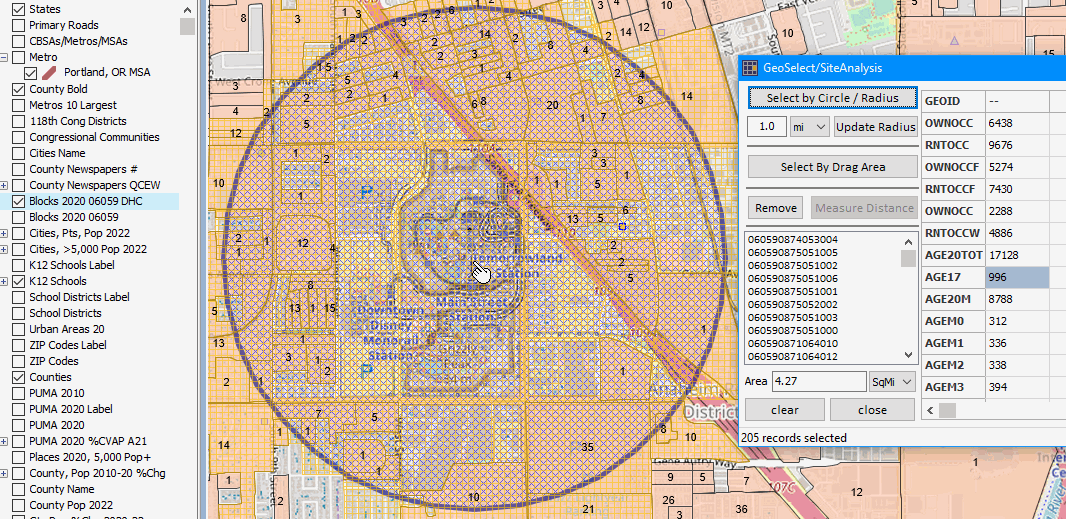
.. click graphic for larger, improved view