
|
|
|
.. resources to create consumable, insightful demographic profiles Accessing demographic data can be very challenging just by itself. Converting those data into a consumable form can be even more difficult and time-consuming. This where the Demographic Analytics 2 tool comes in. Demographic Analytics (DA2) is a Windows-based tool that creates custom narrative comparative analysis and other types of demographic reports based on annual American Community Survey data (ACS 2024). Topics • Illustrative Applications • Mapping your Areas • Vintage 2025 Population Estimates • American Community Survey 1-year and 5-year data • Features and Operations • Installation • Terms of Use Illustrative applications California and Texas in context of United States. 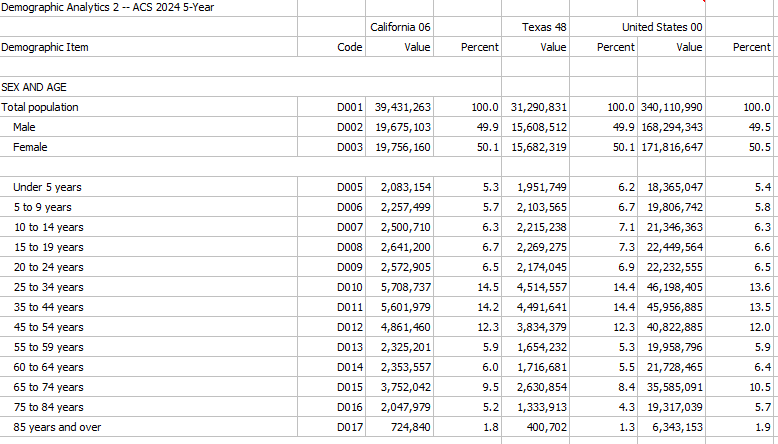 Examples .. excel files generated by "Grid to XLS" operation. • California (040) ... Texas (040) ... U.S. (010) profile • Laguna Beach, CA (160) ... Orange County, CA (050) ... California (050) profile • CC 0647001 (501) ... CD CA 47 (500) ... Orange County, CA (050) profile 119 CDs "Grid to XLS" -- comparing the same area (CD) in 2024-5 to 2024-1 .. How much did CD 0647 change from mid-2022 to mid-2024? • CD CA 0647 (500 2024-5) ... CD CA 0647 (500 2024-1) .. narrative reports generated by "Narrative" operation. Operates on Grid content. • CC 5108005 (501) ... CD VA 08 (500) narrative report ACS 5-year • CC 0647001 (501) ... CD CA 47 (500) narrative report ACS 5-year default geography: • Scottsdale, AZ ... Maricopa County, AZ narrative report ACS 5-year .. any two areas; ACS 2024 5 year data centric to mid-2022; 2 years older than these data: • Scottsdale, AZ ... Maricopa County, AZ narrative report ACS 1-year .. both areas must be 65,000 population or more; ACS 2024 1 year data -- data for 2024 DA1 -- Census 2020: • Winfield, KS ... Cowley County, KS narrative report Census 2020 DA2 -- ACS 2024 5-year data centric to mid-2022; 2.5 years older than ACS 2024 1-year data • Winfield, KS ... Cowley County, KS narrative report ACS 2024 5-year • Irvine, CA ... Orange County, CA narrative report ACS 1-year • Houston, TX ... Harris County, TX narrative report ACS 1-year • Wichita, KS ... Sedgwick County, KS narrative report ACS 1-year You don't have to install DA2. Request a narrative comparative analysis report for your areas. Click here. Use a combination of these areas. Demographic Analytics 2 Start-up View The grid shows a DA2 comparison for California relative to the United States. It is easy to see, at a glance, that the 2024 5-year population for California is 39,431,263 compared to U.S. population of 340,110,990. Click graphic for larger view. Using DA2, compare parts of California for many thousands of geographic areas. 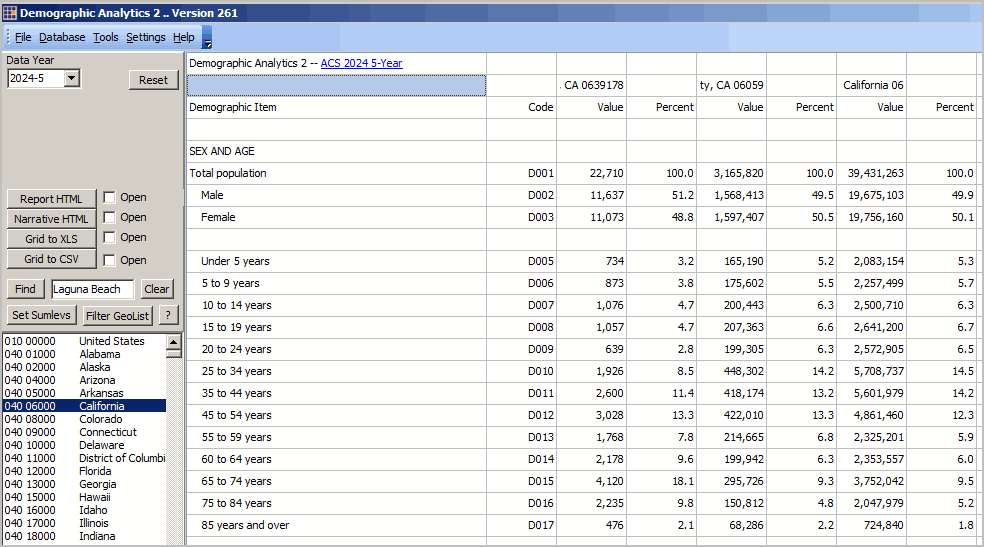 But City and County Data in a Grid are Not Enough DA2 supports applications like comparing data for 10 areas and saving those data to an Excel file. Using iVDA to Map Your Areas .. login (blue button above map) within 10 minutes from initial display .. no cost. key in county name, st (e.g., Orange County, CA) to the search bar and press Enter a triangle/marker is shown at the location .. iVDA part of Visual Data Analytics .. about VDAGIS below .. iVDA works on any device; iPhone (not recommended due to screen size) .. iVDA is an iframe version of VDA Web GIS4 ..open related VDA Web GIS4 Visual Data Analytics Web GIS iVDA is presented below in an interactive mapping window ... Create companion maps for these geographies using VDA Web GIS. Click here to start mapping. More details. DA2 Vintage 2025 Population Estimates .. go to top These data are displayed only using the "Narrative" which operates on data displayed for comparison area 1 and comparison area 2 in the grid. These estimates provide "control data" for the upcoming development of the ACS 2025 data to be released fall 2026. Three rows of data are presented when the user selects a city for comparison area 1 and a county for comparison area 2. Data are shown for: • Census 2020 • 2020 estimate • 2021 estimate • 2022 estimate • 2023 estimate • 2024 estimate • 2025 estimate • Change 2020-25 • Precent change 2020-25 The subject matter differs for the three rows: • total population estimate for the city • total population estimate for the county • total housing units for the county These are the only national scope estimates available for all incorporated places and counties. This tool provides access to all incorporated places (19,xxx) and all counties (3,144). These estimates are regarded as official estimates. See this information for details on challenging these data. DA2 Annual data from American Community Survey .. go to top Unlike DA which provides data from one statistical program Census 2020, DA2 provides data from many annual American Community Survey data (ACS 2024) programs. The ACS data are based on selected data from the ACS Demographic Profiles (DP2, DP3, DP4, DP5) for several years. • ACS 2020 1-year and 5-year data • ACS 2021 1-year and 5-year data • ACS 2022 1-year and 5-year data • ACS 2023 1-year and 5-year data • ACS 2024 1-year and 5-year data -- currently only these options available • ACS 2025 1-year and 5-year data -- fall 2026 DA2 Features and Operations .. go to top Overview .. Create a side-by-side profile for up to 50 areas. Only one instance of DA2 can execute on one computer at one time. Second start-up will show a message and close. Access/start VDA Web Base mapping via the upper left panel button MapIt VDA .. see political/statistical geography; topology; determine a geocode by entering an address. Main Menu>Help>User Guide .. opens this page. Main Menu>Settings>Config opens the configuration form opens a new form Types of Geography Supported .. go to top Code at left is the "summary level" code 010 United States 040 States 050 Counties 140 Census Tracts 160 Cities/Places 300 CBSAs/Metros/MSAs 400 Urban Areas 500 Congressional Districts 501 Congressional Communities 610 State Legislative Districts - Upper 620 State Legislative Districts - Lower 860 ZIP Code Areas 950 School Districts, Elementary 960 School Districts, Secondary 970 School Districts, Unified Run Operations. Select from four methods to select geography. When DA is run, the profiles display in the grid. .. grid profiles(s) can be saved as HTML or XLS. User Interface Key sections of the user interface include: - Control panel, upper left - GeoList box, below control panel - Grid, data display area, remainder of user interface User Interface -- Control Panel .. goto User Interface top ..go to top Create data displays four ways: .. Control Panel, Run from GeoList .. Control Panel, Run from File .. Control Panel, Run from List .. dbl-click GeoList item/geographic area item Creating a DP2 profile in Grid - available geographies are shown in the listbox at lower left of user interface. - double-click a geographic area to display the DP2 profile for that area. - click Clear button to clear all selections in the GeoList listbox. Find Operation - click the Find button to find text/row containing text in edit box. - case sensitive text and exact spelling used in search. - use clear button to unselect all items in listbox. One-Area, Two-area, Multi-Area Profile To display a profile for multiple areas, one option is to click those areas in the listbox. - then click "Run from Geolist" button. Saving DP1 Data from Grid to File The following operations, shown in the Control panel, are used to ssave data shown in Grid to file. First click the associated Open button to to view the data being saved. Next click the type of preferred save button. - Report HTML -- one or two areas/columns (leftmost) shown in grid - Narrative HTML -- two areas/columns (leftmost) shown in grid - Tables XLS -- all areas/columns shown in grid These features perform operations on the GeoList box Find. Locate a geography using the Find button operating on the exact GeoItem spelling in the edit box at right. Set Sumlevs. Performs same operation as Main Menu>Settings>Config .. see below. Filter GeoList. Applies a filter on geolist.dbf and updates GeoList box. Filter GeoList (modified 083123) Use the Filter GeoList Query enables a filter to be applied to the geolist.dbf master file. When clicked, an input box is opened where a filter may be entered. Then click OK to filter. the start-up filter is "sumlev='050' .and. substr(geoid,1,2)='04'" (do not use double quotes) this filter says to show only geolist items that are: sumlev='050' .. counties and substr(geoid,1,2)='04' .. first 2 characters of geoid are 04 .. counties in Arizona the result is 15 counties showing in the GeoList box optionally select all of these then click Run from GeoList button to show profiles for all 15 counties Another filter example: "sumlev='501' .and. substr(geoid,1,4)='0647'" (do not use double quotes) With empty GeoList Query box and paste in sumlev='501' .and. substr(geoid,1,4)='0647' this filter says to show only geolist items that are: sumlev='501' .. Congressional Communities and substr(geoid,1,4)='0647' .. first 4 characters of geoid are 0647 .. CD CA 47 the result is 17 Congressional Communities (CCs) showing in the GeoList box optionally select all of these then click Run from GeoList button to show profiles for all 17 CCs. Other filter examples and details Example: all tracts in two counties: sumlev='140' .and. (substr(geoid,1,5)='20001' .or. substr(geoid,1,5)='29001') .. all tracts in two selected counties. Filter operations and rules User Interface -- GeoList Box .. goto User Interface top ..go to top The GeoList box is at the lower left of the user interface. It contains a list of available geographies using the Run options to extract data and display in grid. The start-up geographies include the U.S., all states, all counties, all cities/places See above for details on GeoList Box operations. Find. Locate a geography using the Find button operating on the exact GeoItem spelling in the edit box at right. Set Sumlevs. Performs same operation as Main Menu>Settings>Config .. see below. Filter GeoList. Applies a filter on geolist.dbf and updates GeoList box. User Interface -- Grid .. goto User Interface top ..go to top The Grid displays the results of a Run operation. The structure of the grid is fixed. Fixed subject matter selections are displayed down the rows. The leftmost column is the descriptive stub for the items. A set of two data columns is displayed for each each geographic item selected in the Run operation. User Interface -- Configuration .. goto User Interface top ..go to top . Main Menu>Settings>Config opens the configuration form. Only the rightmost section is active .. Summary Level Selections Using Config/New Summary Level Selections - the start-up GeoList geography is U.S., states, counties, cities/places. - there are now ~150,000 geographic areas for which DP can be compared for areas 2 at a time .. billions of possibilities. - to accelerate loading of the GeoList box, the Summary Level Selections feature has been added. - start this using Settings>Config. Click checkboxes on for areas that you included in a refreshed GeoList box. - click buton "Proceed with checked selections" to close this form. - that form closes. Wait for message "GeoList refreshed" - the GeoList box now shows only your selected summary levels. - operations at the left and at bottom of Configuration form should not be used. This ends the User Interface section. DA2 Installation and Use .. go to top Install DA2 using this installer. A userid and password are required. The application is now installed in the default folder c:\da2. Start DA2 with the desktop icon or as c:\da2\da2.exe (assuming the recommended default settings were used). The DA2 tool requires Internet. The DA2 application updates from time-to-time. Please register to keep up-to-date. About Microsoft Defender. The DA software uses a security certificate issued by Sectigo. .. However, many users will encounter a Microsoft Defender warning when running the installer. .. Users will also see a "Status" yellow panel in the lower right, assuring the software is safe. .. On the Microsoft Defender blue panel, click the "More Options" button, then click "Run Anyway". .. DA will then proceed to install. Terms of use .. go to top There is no warranty for any aspect of using the DA2 application. The user is responsible for any use of the DA2 application. Neither the DA installer nor content installed on the user computer may be distributed. Data displayed in the grid or saved to file may be distributed or used in any manner so long as complete attribution is provided. Update Details .. go to top ProximityOne User Group .. go to top Join the ProximityOne User Group to keep up-to-date with new developments relating to metros and component geography decision-making information resources. Receive updates and access to tools and resources available only to members. Use this form to join the User Group. Support Using these Resources Learn more about accessing and using demographic-economic data and related analytical tools. Join us in a Data Analytics Web session. There is no fee for these one-hour Web sessions. Each informal session is focused on a specific topic. The open structure also provides for Q&A and discussion of application issues of interest to participants. Additional Information ProximityOne develops geodemographic-economic data and analytical tools and helps organizations knit together and use diverse data in a decision-making and analytical framework. We develop custom demographic/economic estimates and projections, develop geographic and geocoded address files, and assist with impact and geospatial analyses. Wide-ranging organizations use our tools (software, data, methodologies) to analyze their own data integrated with other data. Contact us (888-364-7656) with questions about data covered in this section or to discuss custom estimates, projections or analyses for your areas of interest. |
|
|
