
|
|
|
-- Detailed Demographics to the Census Block Level; 11+ Million Blocks Analyzing extended demographics by census block and higher level geographic areas ... new data resources from Census 2010. The Census 2010 Summary File 1 (SF1) release was completed August 25, 2011. The SF1 is the third major Census 2010 data resource following the Demographic Profile Summary File (DPSF) data released in May 2011 and following the P.L. 94-171 redistricting data released earlier in 2011. The SF1 contains 100 percent data asked of all people and about every housing unit on topics such as sex, age, race, Hispanic origin, household relationship, household type, group quarters population, housing occupancy, and housing tenure. The SF1 is released as individual files for the U.S., each state, D.C., Puerto Rico and as a national summary file. Data Scope, Content, Structure and Organization • Data Dictionary Table Matrix [DOC] • Table Shell [XLS] • Technical Documentation [PDF] Access/Analysis Tools & Applications 10.19.17. 115th Congressional Districts Summary File 1 Update - release date 10/19/17 - 115th Congressional Districts section - http://proximityone.com/cd115.htm - Technical documentation for corresponding 113th CD Census 2010 SF1 data ... no specific CD115 retabulation documentation ... file structure is the same; data retabulated for Florida, Minnesota, North Carolina and Virginia. - Data Access -- FTP Downloads 02.22.16. Analyzing County Group Quarters Population ... interactive table & GIS applications based partly on Census 2010 SF1 ... see: http://proximityone.com/group_quarters..htm 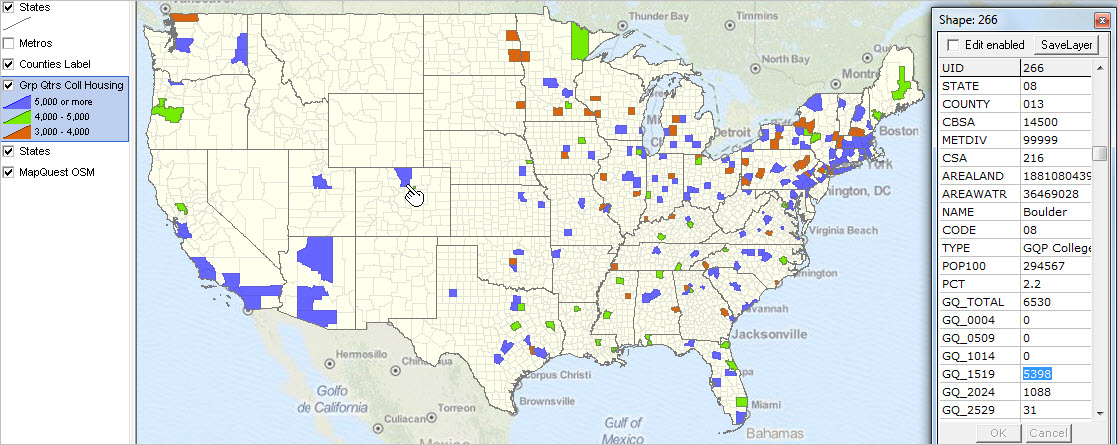 10.02.14. Mapping Urban/Rural Patterns by Census Block ... using TIGER 2014 and Census 2010 demographics & GIS applications ... see http://proximityone.com/mapping_census_blocks.htm 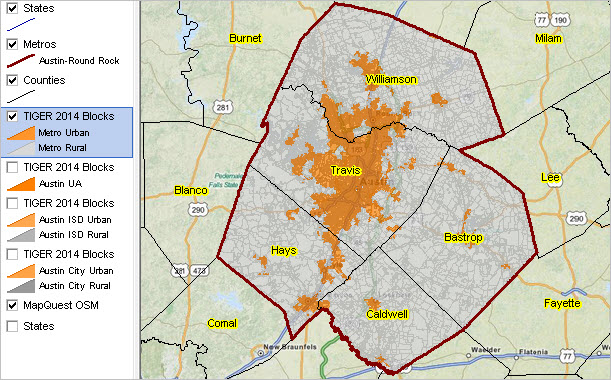 09.05.14. Examining Neighborhood Diversity Patterns ... examine your area; applications use Census 2010 SF1 data by tract ... see http://proximityone.com/neighborhood_diversity.htm 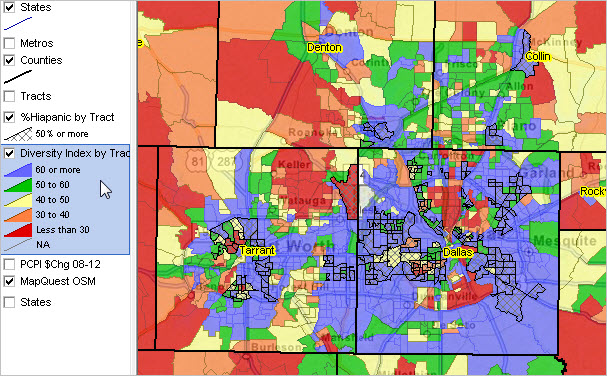 06.20.14. Demographic Economic Data Extraction ... Demographic Economic Data Extraction (DEDE) API tool ... extract Census 2010 and multi-sourced demographic economic data ... census block, block group and other geography 11.16.13. Using Census 2010 Summary File 1 Census Block Data
04.11.13. Census 2010 Summary File 1 Released for 113th Congressional Districts
01.17.13. Mapping America's Urban Census Block Patterns
01.14.13. Summary File 1 Urban/Rural & Congressional District 113 Update
09.27.12. Summary File 1 Urban/Rural Update
08.07.12. Use Census APIs to access Census 2010 via S&O Server
07.05.11. ZIP Code Demographics by City-Place: Using Census 2010 Summary File 1
06.21.11. Tools for Analyzing Single Year of Age Demographics from Summary File 1
Illustrative Profiles Click on links in upper right scroll box to view full U.S. profile (with California and Texas) and profiles for other selected areas. These profiles, and ranking table below, were developed with ProximityOne Situation & Outlook software using the DPFS database. Note that in comparison to the DPSF data: • These profiles show a small subset of the scope of demographic subject matter contained in the SF1 data. • These subject matter items may be presented at the census block and any higher level geographic summary area for which Census 2010 data are tabulated using the SF1 data. Develop similar comparative analysis profiles for any set of geographies in DPSF/SF1 dataset. Contact us for more information (mention SF1). Detail Available in SF1 Not Previously Available • Single year of age by sex • More detail on children, including adopted, stepchildren and grandchildren • Race and Hispanic origin of householder • More detail on household relationships • Group quarters population by sex, age and group quarters type • Housing tenure (rented or owned) by age, household type, race and Hispanic origin of householder • Mortgage status of owned housing units Counts about previously unreleased race and Hispanic or Latino origin groups are also available, including: • American Indian and Alaska Native tribal groupings, such as Cheyenne, Navajo and Yup'ik • Asian groups, such as Bangladeshi, Hmong and Pakistani • Hispanic origin groups, such as Argentinean, Colombian and Guatemalan • Native Hawaiian and Other Pacific Islander groups, such as Fijian, Marshallese and Tongan ProximityOne User Group Join the ProximityOne User Group to keep up-to-date with new developments relating to metros and component geography decision-making information resources. Receive updates and access to tools and resources available only to members. Use this form to join the User Group. Support Using these Resources Learn more about accessing and using demographic-economic data and related analytical tools. Join us in a Data Analytics Lab session. There is no fee for these one-hour Web sessions. Each informal session is focused on a specific topic. The open structure also provides for Q&A and discussion of application issues of interest to participants. Additional Information ProximityOne develops geodemographic-economic data and analytical tools and helps organizations knit together and use diverse data in a decision-making and analytical framework. We develop custom demographic/economic estimates and projections, develop geographic and geocoded address files, and assist with impact and geospatial analyses. Wide-ranging organizations use our tools (software, data, methodologies) to analyze their own data integrated with other data. Follow ProximityOne on Twitter at www.twitter.com/proximityone. Contact us (888-364-7656) with questions about data covered in this section or to discuss custom estimates, projections or analyses for your areas of interest. |
|
|
