
|
|
|
October 2026 .. the Census Bureau TIGER digital map database, released annually, is a set of shapefiles and related files that provide a unique resource to map and geospatially analyze geography covering the U.S. wall-to-wall. These resources play an important role in wide-ranging geospatial analyses and decision-making information solutions. Warren Glimpse, founder of ProximityOne, developed the Columbia, MO GBF/DIME file later used as the prototype for the TIGER/Line program and is developer of CV XE GIS desktop and Web-based GIS applications/tools that facilitate use of the TIGER/Line data with other wide-ranging data in applications such as pattern/trend analysis, geospatial processing and location-based operations. Use these geographic data resources with the Visual Data Analytics (VDA) Web GIS -- a resource of ProximityOne and Tsukasa Consulting (Osaka, Japan). Chronological Release Dates & Updates TIGER 2026 ("TL") Version The TIGER 2026 ("TL") digital map database was released October 8, 2026. The 2026 TIGER/Line Shapefiles contain current geographic extent and boundaries of both legal and statistical entities for the states, D.C., Puerto Rico and island areas. This vintage includes boundaries of governmental units that match data from the surveys that use 2026 geography (e.g., the 2027 American Community Survey). The 2026 TIGER/Line Shapefiles also include geographic feature shapefiles and relationship files. Feature shapefiles represent the point, line, and polygon features in the in the database (e.g., roads and rivers). Both the feature shapefiles and relationship files reflect updates made in the database through May 2026. TIGER 2025 ("CB") Smoothed Version The TIGER 2025 ("CB" or GENZ2025), smoothed version shapefiles, was released in April 27, 2026. In scope similar to the TIGER 2025 ("TL") version, these shapefiles are clipped at shoreline, gulf of Mexico and the Great Lakes. They also feature smoothed vertices boundaries. Census block level boundaries are only produced in the "TL", non-smoothed version. TIGER 2025 ("TL") Version The TIGER 2025 ("TL") digital map database was released September 26, 2025. See about TIGER 2025. The 2025 TIGER/Line Shapefiles contain current geographic extent and boundaries of both legal and statistical entities for the states, D.C., Puerto Rico and island areas. This vintage includes boundaries of governmental units that match data from the surveys that use 2025 geography (e.g., the 2026 American Community Survey). The 2025 TIGER/Line Shapefiles also include geographic feature shapefiles and relationship files. Feature shapefiles represent the point, line, and polygon features in the in the database (e.g., roads and rivers). Both the feature shapefiles and relationship files reflect updates made in the database through May 2025. Augmented TIGER 2025 Streets Database The 2025 Streets Digital Map Database (SDMD) is an augmented version of the TIGER 2025 streets (edges) shapefile. The SDMD covers the U.S. and states. The SDMD includes all records and fields from the TIGER 2025 database. The Edges dbf record "fullname" field is reduced from 100 to 50 characters. The ZIP code/ZCTA code left and right is updated as sourced right and left side address file. The right and left side block code are included in the streets record. When and where possible, the SDMD has primary names added and street address ranges updated. New, modified records, street segments, are add reflected updates not included in the TIGER 2025 data. TIGER 2024 ("CB") Smoothed Version The TIGER 2024 ("CB" or GENZ2024), smoothed version shapefiles, was released in April 2025. In scope similar to the TIGER 2024 ("TL") version, these shapefiles are clipped at shoreline, gulf of Mexico and the Great Lakes. They also feature smoothed vertices boundaries. Census block level boundaries are only produced in the "TL", non-smoothed version) TIGER 2024 ("TL") Version The TIGER 2024 ("TL") digital map database was released September 26, 2024. See about TIGER 2024. The 2024 TIGER/Line Shapefiles contain current geographic extent and boundaries of both legal and statistical entities for the states, D.C., Puerto Rico and island areas. This vintage includes boundaries of governmental units that match data from the surveys that use 2024 geography (e.g., the 2024 American Community Survey). The 2024 TIGER/Line Shapefiles also include geographic feature shapefiles and relationship files. Feature shapefiles represent the point, line, and polygon features in the in the database (e.g., roads and rivers). Both the feature shapefiles and relationship files reflect updates made in the database through May 2024. Augmented TIGER 2023 Streets Database The 2023 Streets Digital Map Database (SDMD) is an augmented version of the TIGER 2023 streets (edges) shapefile. The SDMD covers the U.S. and states. The SDMD includes all records and fields from the TIGER 2023 database. The Edges dbf record "fullname" field is reduced from 100 to 50 characters. The ZIP code/ZCTA code left and right is updated as sourced right and left side address file. The right and left side block code are included in the streets record. When, where possible, the SDMD has primary names added and street address ranges updated. New, modified records, street segments, are add reflected updates not included in the TIGER 2023 data. TIGER 2023 ("TL") Version The TIGER 2023 ("TL") digital map database was released in December 2023. See about TIGER 2023. The 2023 TIGER/Line Shapefiles contain current geographic extent and boundaries of both legal and statistical entities for the states, D.C., Puerto Rico and island areas. This vintage includes boundaries of governmental units that match data from the surveys that use 2023 geography (e.g., the 2023 American Community Survey). The 2023 TIGER/Line Shapefiles also include geographic feature shapefiles and relationship files. Feature shapefiles represent the point, line, and polygon features in the in the database (e.g., roads and rivers). Both the feature shapefiles and relationship files reflect updates made in the database through May 2023. TIGER 2022 ("CB") Smoothed Version The TIGER 2022 ("CB" or GENZ2022), smoothed version shapefiles, was released in April 2023. In scope similar to the TIGER 2022 ("TL") version, these shapefiles are clipped at shoreline, gulf of Mexico and the Great Lakes. They also feature smoothed vertices boundaries. Census block level boundaries are only produced in the "TL", non-smoothed version) TIGER 2022 ("TLRD") Version The TIGER 2022 Redistricting ("TLRD") digital map database was released in February 2023. The TIGER 2022 Redistricting ("TLRD") files are a variation of the TIGER 2022 ("TL") files described below. The TIGER 2022 Redistricting TLRD files include the first versions of the 118th Congressional Districts and State Legislative District, Cycle 2022, post-redistricting shapefiles. The TLRD files also include the Census 2020 census block shapefiles populated with the 2020 population and housing units and coded with the Urban Area GEOID, not included in the TL22 version. Thees files also include the restructured county shapefiles for Connecticut. TIGER 2022 ("TL") Version The TIGER 2022 ("TL") digital map database was released in October 2022. See about TIGER 2022. The 2022 TIGER/Line Shapefiles contain current geographic extent and boundaries of both legal and statistical entities for the states, D.C., Puerto Rico and island areas. This vintage includes boundaries of governmental units that match data from the surveys that use 2022 geography (e.g., the 2022 American Community Survey). The 2022 TIGER/Line Shapefiles also include geographic feature shapefiles and relationship files. Feature shapefiles represent the point, line, and polygon features in the in the database (e.g., roads and rivers). Both the feature shapefiles and relationship files reflect updates made in the database through May 2022. TIGER 2020 The TIGER 2020 were released in January 2021. These initial geographic data are in the form of shapefiles are the first part of the TIGER Census 2020 geographic data .. developed for use with Geographic Information System (GIS) tools. The P.L. 94-171 files are developed to meet the needs of states for purpose of redistricting congressional boundaries based on Census 2020 data. TIGER 2019 The Census Bureau TIGER 2019 geographic data were released in August 2019. TIGER GeoDatabase The Census Bureau TIGER shapefiles contain data that can be used to represent different types of point, line, and polygon geography covering the U.S. earth surface. More about TIGER. The TIGER shapefiles, and related derivative products, play an important role in wide-ranging geospatial analyses and decision-making information solutions. Warren Glimpse, founder of ProximityOne, developed the Columbia, MO GBF/DIME file used as the prototype for the TIGER/Line program and is developer of CV XE GIS desktop and Web-based GIS applications/tools that facilitate use of the TIGER/Line data with other wide-ranging data in applications such as pattern/trend analysis, geospatial processing and location-based operations. 2019 Shapefiles and Datasets Related to TIGER Shapefiles and datasets derived from or related to TIGER 2019 include many types of geography and data. The data are developed in the form of shapefiles and dbase files that may be used directly with the ProximityOne CV XE GIS software at no fee. Perform wide-ranging mapping and geospatial analysis applications using these GIS resources. See more about mapping statistical data. • TIGER/LIne 2019 Main Detailed features of the TIGER/Line 2019 files are summarized below for TIGER/Line 2017. • TIGER/LIne 2017 Main • 2017 Census Blocks Shapefiles with integrated demographics • 2017 Roads Shapefiles • Other TIGER 2017 Data See related TIGER/LIne 2016 Main TIGER/Line Vintages and Derived Files .. goto top The TIGER/Line files are updated annually, usually in August. There are important reasons to use the latest vintage TIGER/Line files. • for political areas, boundaries reflect the most recent officially defined areas. .. generally boundaries are defined as of January of the TIGER vintage year. • roads shapefiles often have updated and improved coverage and attributes relative to previous vintages. • as roads geometry is corrected/updated, census block geometry/boundaries are corrected/updated. • all higher level geography based on blocks are likewise updated (all tabulation geographies). Note that the number of Census 2010 blocks does not change as new TIGER/Line vintage files become available. • there are no updated Census 2010 demographics for Census 2010 tabulation blocks as conveyed in TIGER 2019. Earlier vintage TIGER/Line files, or derived files, might better match application needs. • TIGER/Line 2010/Census 2010 matches tabulation geography geocodes for Census 2010 block geocodes. .. consider that many county and tract codes exist in TIGER 2019 as compared to TIGER 2010. • TIGER/Line vintages are designed to match American Community Survey (ACS) annual releases. .. the 2014 U.S. Gazetteer Files (from TIGER 2014) match the ACS 2014 tabulation areas. .. the 2015 U.S. Gazetteer Files (from TIGER 2015) match the ACS 2015 tabulation areas. ... .. the 2019 U.S. Gazetteer Files (from TIGER 2019) match the ACS 2018 tabulation areas. • TIGER/Line 2019 shapefiles extend to territorial limit. .. this results in displayed boundaries on maps extending into the ocean or lake water areas. .. smoothed/generalized shapefiles derived from TIGER/Line files are truncated at shoreline. .. smoothed shapefiles availability from the Census Bureau might lag 6 months from the TIGER/Line release date. .. shoreline truncated shapefiles are available from ProximityOne now. View TIGER/Line Shapefile Geography with Google Maps API • Fort Bend County, TX by census tract & Sugar Land • Warren County, IA by census tract & Indianola • Warren County, MO by census tract & Warrenton • Washington, DC by census tract • Washington, DC by ZIP Code • Kansas City, MO-KS Area by ZIP Code • Houston, TX area school districts CV XE GeoGateway .. goto top Use the CV XE GeoGateway to access TIGER/DMD shapefiles. Automatically build GIS projects using the GeoGateway in a few minutes. Shp2XML -- Extracting TIGER Shapefile Geometry • tool to convert shapefile geometry to XML/XLS • create polyline files; display shapefile geometry on Google/Bing maps • see http://proximityone.com/shp2xml.htm 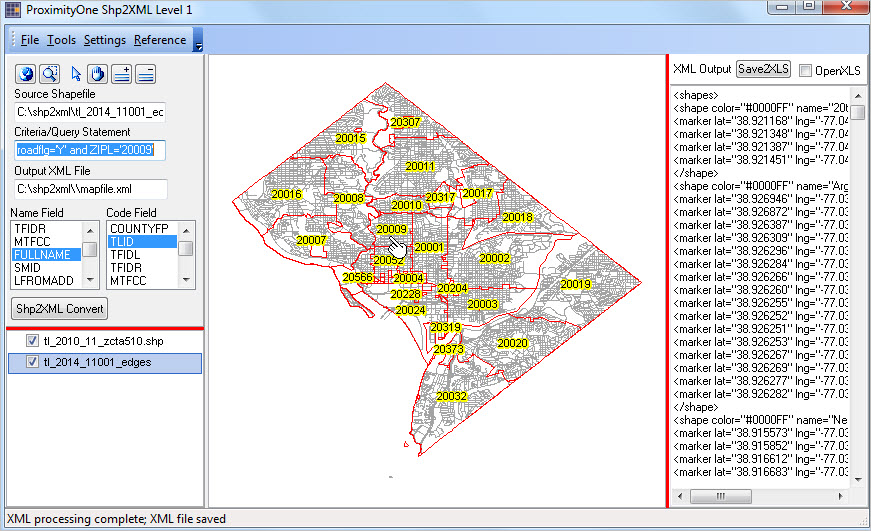 TIGER/Digital Map Database Editor .. goto top Use the CV XE GIS TIGER/DMD Editor to improve TIGER files to meet a broader set of geocoding, routing and geospatial application needs. Resolve issues such as missing or poorly structured line segments, improperly named line segments, line segments with missing names and address ranges, among others. The TIGER/DMD Editor is used to develop/maintain the Digital Map Database (DMD). DMD data are structured in a manner compatible with TIGER and maintain a near 100-percent crosswalk between DMD segments and TIGER segments. TIGER-related augmentations include: • adding and updating road segments with right- and left-side geocoding to the census block level • adding/updating address ranges for road segments where missing/incomplete in original files. • adding alternative road names. • reclassifying roads (e.g. some counties have too many/too few roads classified as primary/secondary). • coding right- and left-side road segments with ZIP+4 Codes. Role and Scope of TIGER/Line Shapefiles .. goto top TIGER/Line shapefiles are created from the Census Bureau's TIGER (Topologically Integrated Geographic Encoding and Referencing) database of selected geographic and cartographic information. TIGER is used by the Census Bureau to support the mapping and related geographic activities required by the decennial and economic censuses and statistical survey programs. TIGER/Line shapefiles are available for public use and are typically used to provide the digital map base for GIS (Geographic Information System) and mapping applications. TIGER/Line files are digital, vector-based point, line and polygon shapefiles and related files. TIGER/Line shapefiles do not contain any demographic or other subject matter data though wide-ranging subject matter data can be knit-together with the shapefiles. Reference and thematic maps may be created using TIGER/Line shapefiles using GIS or mapping software like CV XE GIS. The TIGER/Line shapefiles include: • boundary shapefiles for all Census 2010/2000 political and statistical tabulation areas. • post-2010 annual releases; updates for political areas and selected geography. • water and landmark area polygon shapefiles. • road, rail, water and related line/segment-oriented shapefiles. • point and specific location shapefiles (schools, shopping centers, neighborhoods, etc.) • related reference files that facilitate geospatial processing. • Census 2010 & later TIGER/Line files reflect: - overall improvements and updates resulting from the Census 2010 LUCA program. - extensive qualititative and coverage improvement for roads/streets. Importance of TIGER/Line Shapefiles .. goto top Visual analysis made possible by maps is essential to effective decision-making. Development of underlying data often depends on the ability to relate data organized by one type of geography to data organized for another type of geography. The Census Bureau TIGER/Line shapefiles play an indispensable role in meeting these needs. They provide the underlying vector-oriented geographic data used in most U.S. mapping and GIS applications. Support Using these Resources Learn more about demographic economic data and related analytical tools. Join us in a Data Analytics Lab session. There is no fee for these Web sessions. Each informal session is focused on a specific topic. The open structure also provides for Q&A and discussion of application issues of interest to participants. ProximityOne User Group Join the ProximityOne User Group to keep up-to-date with new developments relating to geographic-demographic-economic decision-making information resources. Receive updates and access to tools and resources available only to members. Use this form to join the User Group. Additional Information ProximityOne develops geodemographic-economic data and analytical tools and helps organizations knit together and use diverse data in a decision-making and analytical framework. We develop custom demographic/economic estimates and projections, develop geographic and geocoded address files, and assist with impact and geospatial analyses. Wide-ranging organizations use our tools (software, data, methodologies) to analyze their own data integrated with other data. Contact us (888-364-7656) with questions about data covered in this section or to discuss custom estimates, projections or analyses for your areas of interest. |
|
|
